You’ve chatted with AI for a while now. You’ve asked it questions, had it draft emails, maybe talked through a decision or two. So when people say AI can build things, it lands as a slightly different category, the kind of thing other people do, the kind with code in it.
It isn’t. Here is the whole trick: you paste a plain-English description into ChatGPT or Claude, and you get back a real, working game you can play, with no code and no setup. Change the words and you change the game. Below is the exact description I handed to two different AIs, word for word, and what each one made.
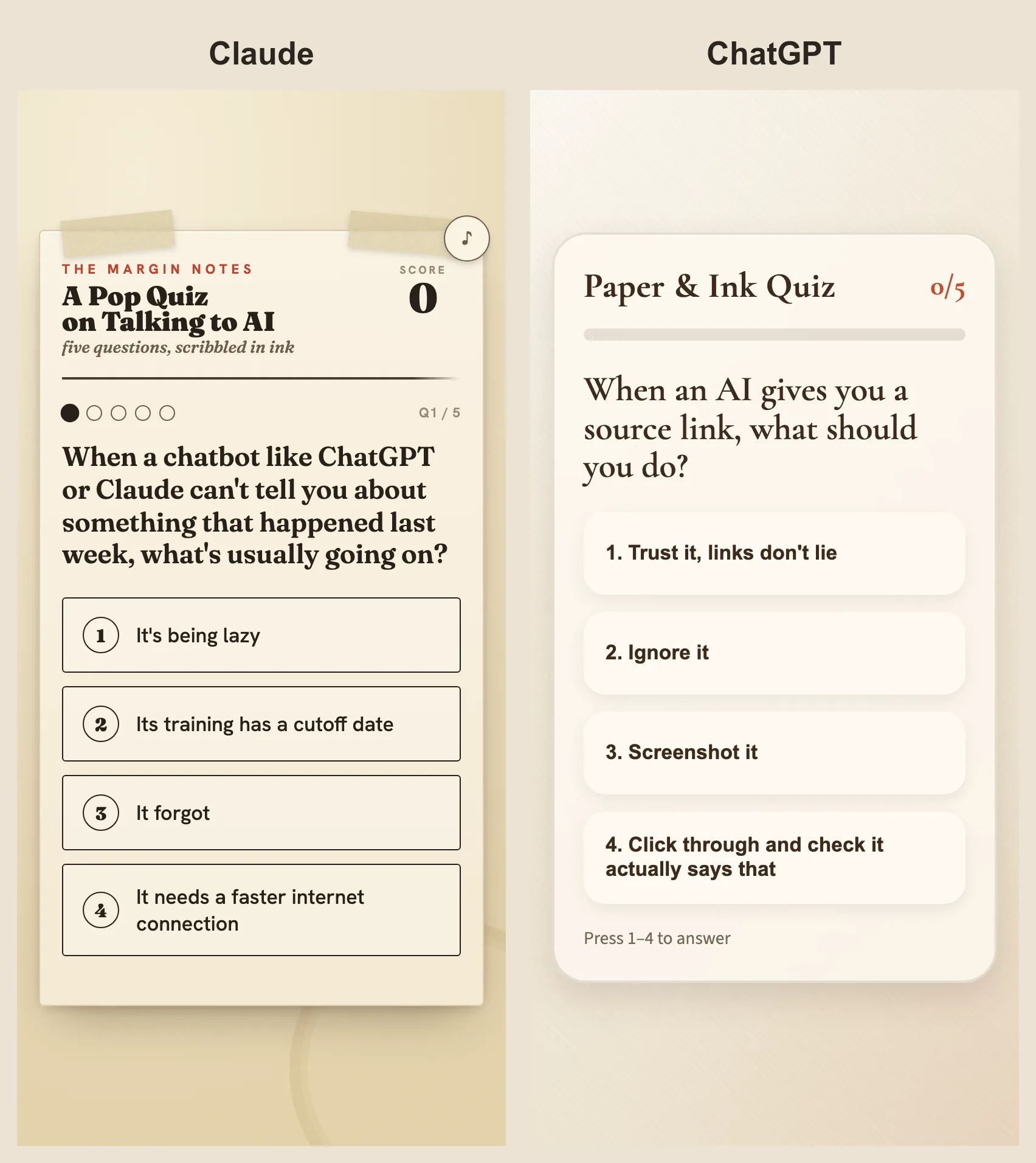
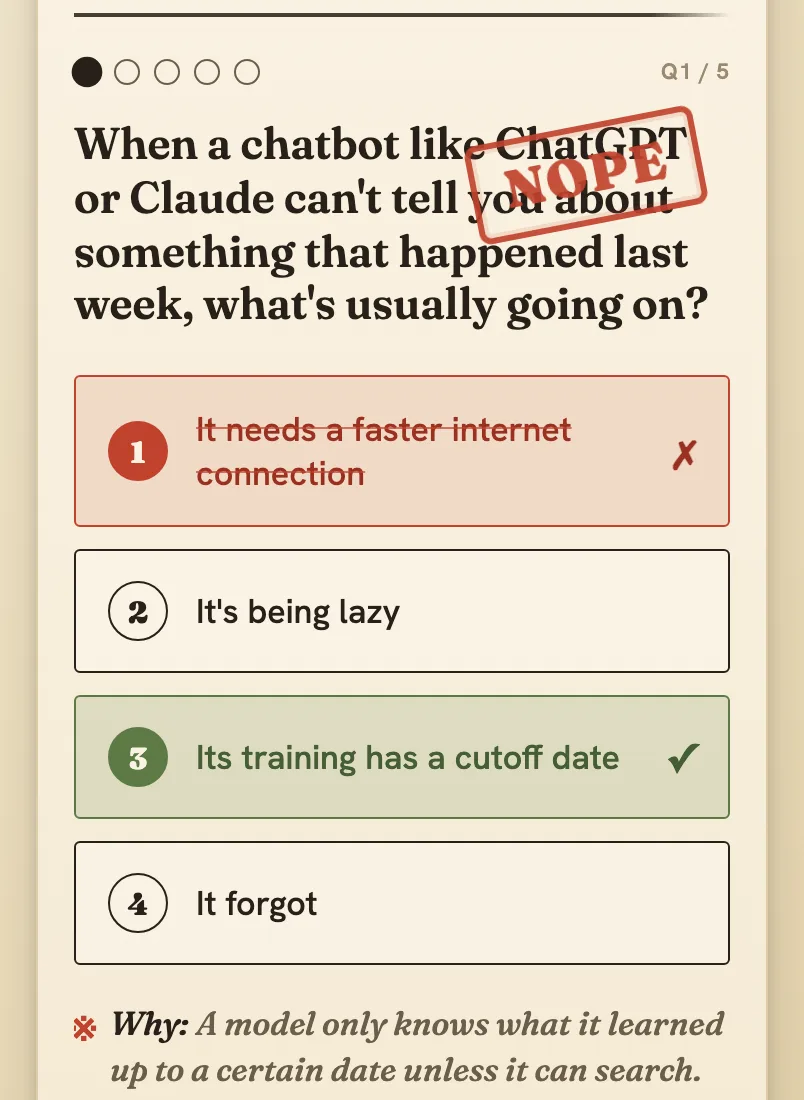
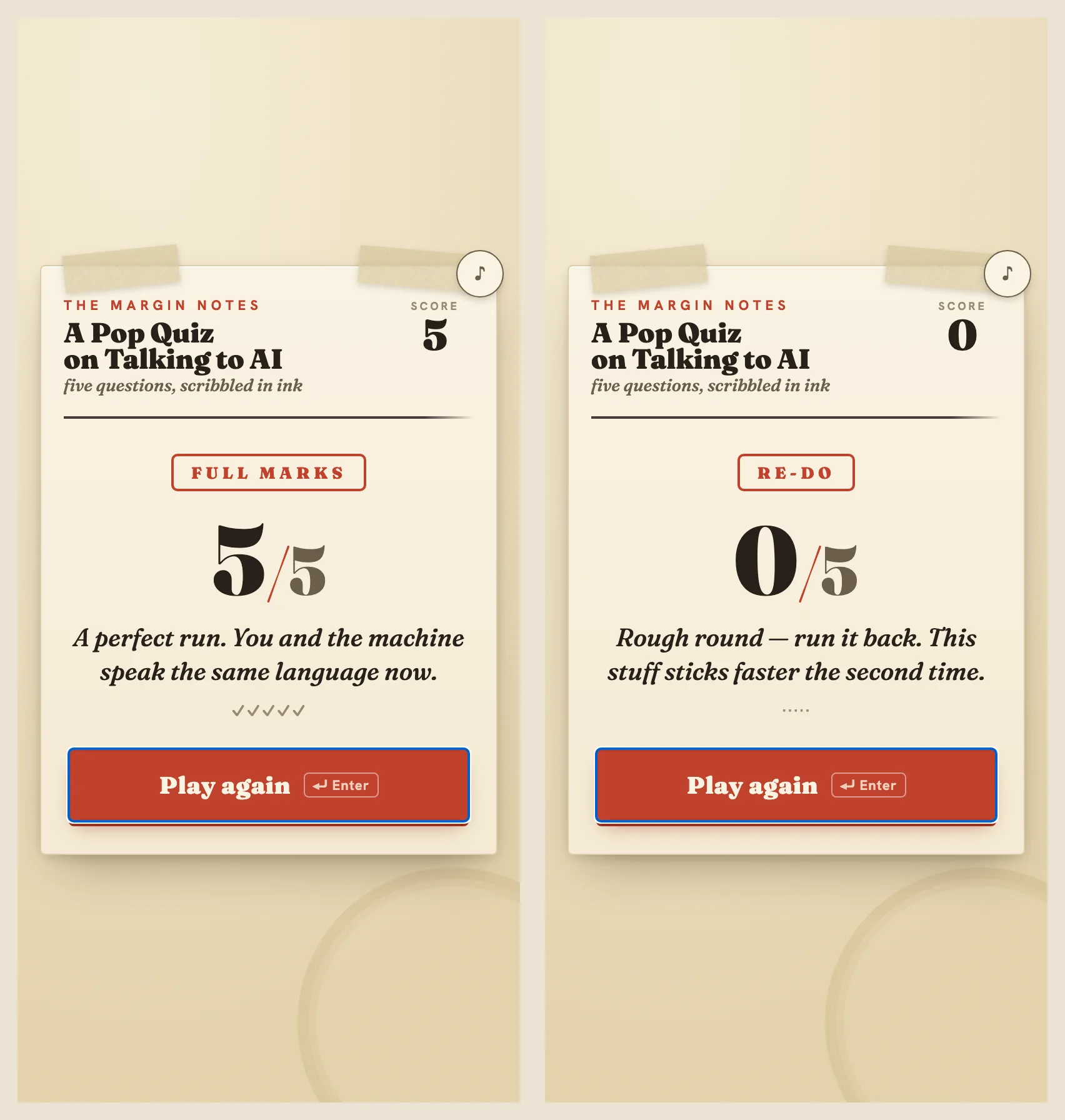
That’s a real game. It keeps score, shuffles the questions, tells you why each answer was right. I described it; the AI made it. No code went into it anywhere, just the plain-English description.
The words I actually pasted
Here’s the description in full, the whole prompt you paste. The two parts in brackets are the only parts you change. Copy it, paste it into ChatGPT or Claude, and swap those two parts for whatever you want.
Build me a quiz game I can play right here in this chat. Make it a real,
working app, not an explanation of code. Build it as one self-contained
page so it runs on its own, no setup and no internet needed.

How it plays:
- Show one question at a time, answers as big buttons.
- When I choose, mark my pick right or wrong, reveal the correct answer,
  show the one-line "why," then give me a Next button.
- Keep score. At the end show my score out of the total, a line that
  changes with how I did, and a Play again button.
- Every play, shuffle the question order and the answer order.

How it should look (this part matters, don't give me a plain default):
- Commit to ONE clear visual style and carry it all the way through.
  Vibe: [PICK ONE OR WRITE YOUR OWN: warm paper-and-ink / neon arcade /
  calm pastel / bold magazine / retro computer terminal].
- Use characterful fonts that fit the vibe: a distinctive one for the
  question and score, a clean one for the rest. Not plain Arial or the
  default system font.
- Pick one main color and one sharp accent; use them confidently. Give
  the background some life (a soft gradient or subtle texture), not flat white.
- Make it feel alive: animate in on load, a satisfying beat when I'm right
  and when the score climbs, smooth slides between questions. Tasteful.
- Phone-first: big tap targets, big readable text, room to breathe. Let me
  also press 1-4 to answer and Enter for Next.

My questions (swap this whole list for any topic; keep the simple shape):
- Question: (your question)
  Answers: (option) (option) (option) (option)
  Correct: (which is right)
  Why: (one line)
Most of that is detail about how it should look, because a vague request gets you a vague gray rectangle. The longer you describe the feel you want, the closer the result lands. The filled-in version used five questions about talking to AI, the kind of thing this site is about, and asked for warm paper-and-ink. You can fill it with trivia about your dog.
If a prompt this long looks like a lot to produce on your own, good news: you don’t have to write one like this from scratch. You can ask the AI to help you build a prompt and refine it together until it’s right. You can ask it to write a first draft of the prompt and then tweak that yourself. Or you can start with a rough one-liner, like “make me a quiz game with a paper-and-ink look,” and go back and forth from there. Any of those gets you something to paste.
This site is openly AI-made, so it’s only fair to say where the prompt above came from: not from a person sitting down and writing it cold. It was worked out with AI’s help, the same back-and-forth you’re being pointed at, and that’s worth saying plainly rather than hiding, because it’s how this actually works. You don’t out-write the AI to get a good prompt out of it; you talk to it until the prompt is good, and then you let it build.
Where the game actually appears
This is the one real difference between the two, and it’s about where the thing runs, not whether it works.
I gave this to a paid Claude account, running its Opus 4.8 model, and to a free ChatGPT account. One run each. These tools are a little different every time you ask, so your version won’t match mine pixel for pixel, and that’s normal.
Claude built it as an Artifact, which is Claude’s word for a thing it makes that opens in its own panel beside the chat. The game ran right there in that panel, ready to play, with nothing to save and nothing to open. Anthropic’s own description of Artifacts lists “playing games, solving problems” among the things they’re for, and that’s exactly what showed up.
ChatGPT, on the free tier, did it the other way. Instead of running the game, it wrote out the file and said to save it as quiz.html and open it in a browser. The steps on your end: copy the block it gives you into a plain text file, name it quiz.html, then double-click it, and the game opens in a new browser tab. One extra step, same result: a working game built from the same words. (The code block does have a small play button on it, so free ChatGPT can show you a preview; it just doesn’t lead with a running game the way Claude does.)
On the paid version of ChatGPT you’ll probably get the smoother route, likely running the game in its own panel the way Claude does, though that’s an expectation rather than something tested here, since the capture used the free tier.
This is paid Claude against free ChatGPT. I can’t run Claude on a free tier in the setup used here, because our capture tool needs the paid login, so it’s one run on each. The fair way to read the comparison is by experience, not “which model won.” One runs the thing for you on the spot. The other hands you the thing and you give it a name and a double-click. If you only have the free ChatGPT, you still get the game.
Change one word, change the world
The vibe is a single word in the description, and it’s not decoration. It’s a dial.
I went back to Claude and asked for the exact same quiz with a neon arcade vibe instead. Same questions, same rules, one word swapped. It built a completely different world.
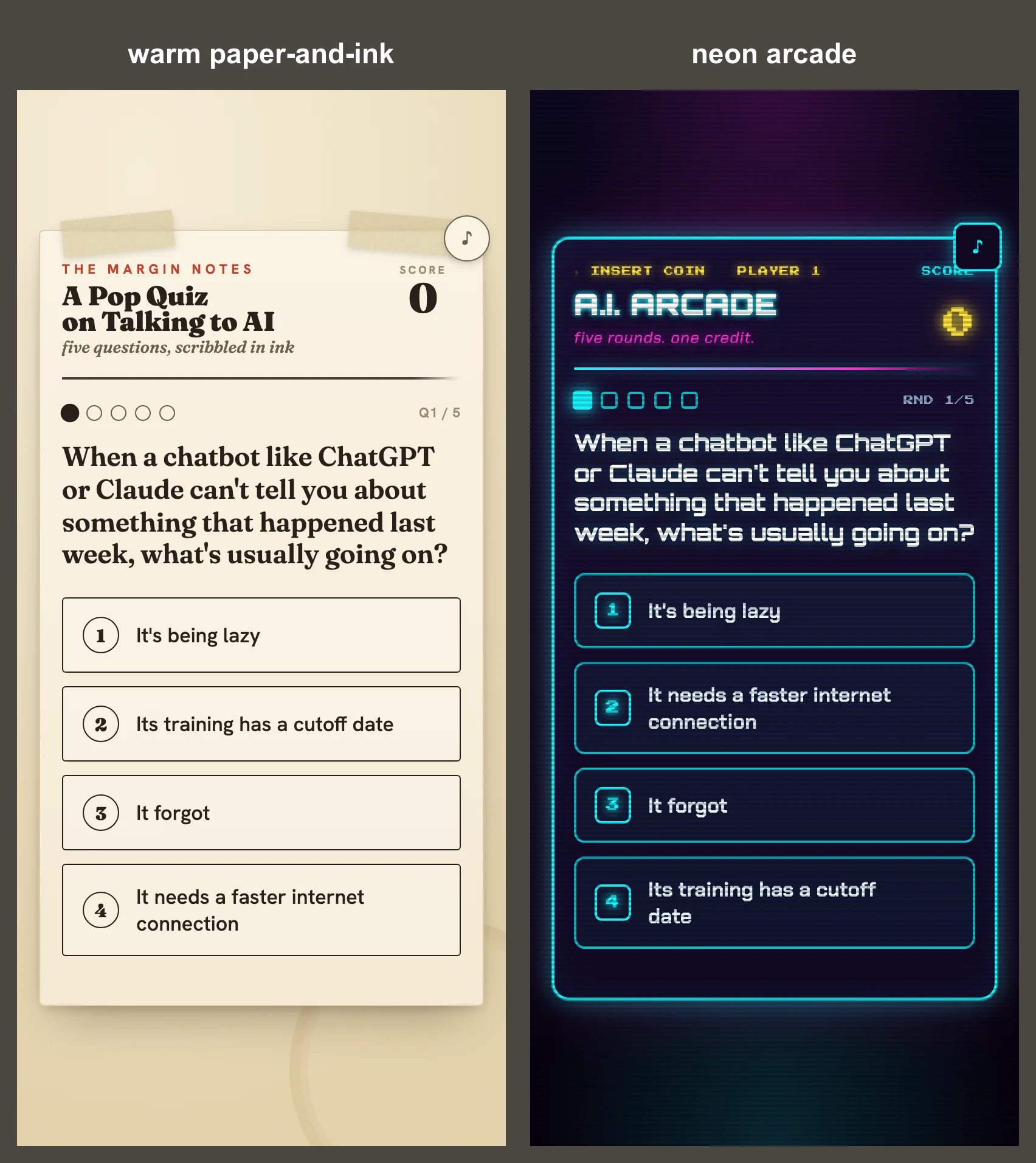
Same game underneath. A notebook on the left, an arcade cabinet on the right, and the only thing that moved was one adjective. The questions are a list near the bottom of the description, in the same plain shape; replace the whole list and you have a quiz about Roman emperors or your fantasy football league. You’re editing words in a document. Nothing under the hood needs you.
When it breaks, you tell it what you see
Neither version was perfect on the first try. This is the part that usually scares people off, so here’s exactly what went wrong and exactly how little it took to fix.
Claude’s neon version came out beautiful except for two tiny spots in the top corners. Two little icons, a music note and a small triangle, hadn’t drawn. In their place sat the raw code that’s supposed to turn into those icons, showing as literal text.
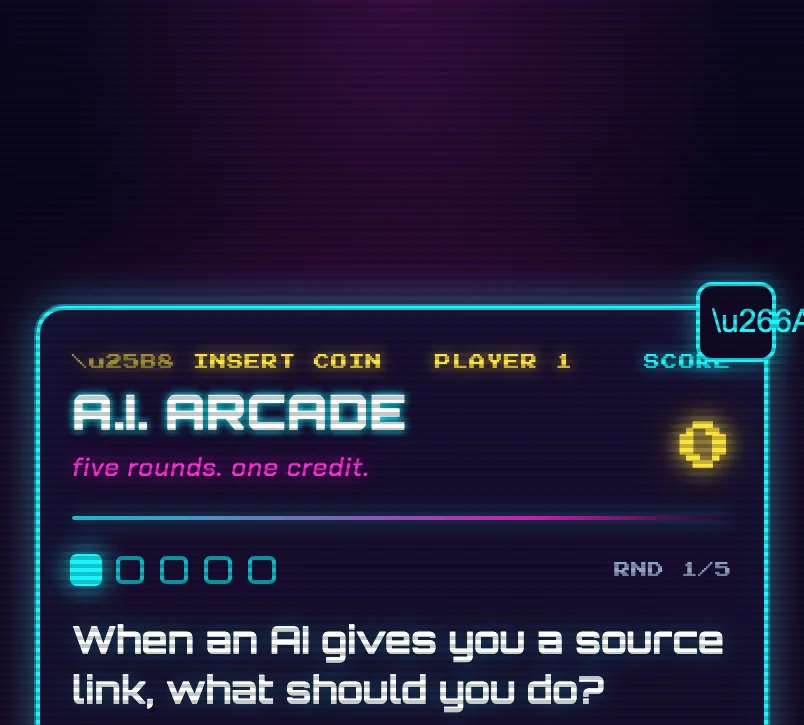
You don’t need to know what that raw code means, and the fix takes no code from you either. I told Claude, in plain words, that the raw text was showing in the corners instead of the little icons and could it fix that. It rebuilt the game with the icons rendering properly. Nothing to edit by hand.
ChatGPT’s first build broke harder. Its file, opened in a browser, showed the title and a score of 0 and then nothing, just blank where the questions should be. So I told it, in plain words, that the page only showed the title and a zero and no questions appeared. It diagnosed itself immediately:
There’s a JavaScript syntax error in the quiz data… I accidentally left an extra backslash before the opening quote.
Because the script fails to parse, none of the game code runs, which is why you only see the static HTML (the title and score).
One stray backslash, on the one answer that happened to contain an apostrophe, and the whole game refused to run. ChatGPT spotted it from my description of a blank screen, told me the exact character to remove, and after that the game played fine. Two different AIs, two different first-try slip-ups, and in both cases the entire repair was me describing what looked wrong, the way you’d describe it to a friend over the phone.
One free-tier wrinkle worth knowing: when I asked ChatGPT for the whole corrected file to copy, it gave me only the changed snippet rather than the full thing again, telling me the rest was identical to what it had already sent. Claude, by contrast, regenerates its whole Artifact every time. On the free tier you sometimes stitch the fix in yourself; it’s a paste, not a programming task.
Two slots, and an AI that offers more
So the description has exactly two parts you touch without any fear: the vibe word and the question list. Want a calm pastel study quiz on Spanish verbs? Change the vibe to calm pastel, drop in your verbs. Want ten questions instead of five? Add five more to the list, or just tell the AI “make it ten questions.” It’s a document, not a machine. You can’t break it by editing words.
And you don’t have to think of the improvements yourself. After building the paper version, Claude offered, on its own, to wire in a few things I hadn’t asked for: a different color palette, more questions, a countdown timer. After the neon one it offered a per-round timer, a combo bonus for answer streaks, even a screen-shake when you miss. You say yes to the one you like, in plain English, and it builds it. The conversation is the controls.
Your turn
Copy the prompt above. Paste it into whichever AI you already use. Pick a vibe, or write your own three-word one. Swap the five sample questions for any topic you like, and if you can’t think of any, ask the same AI to write you five questions about something and paste those in.
In Claude you’ll get something you can play in the next breath. In free ChatGPT you’ll get a file to save and open, which takes about ten extra seconds. Either way, the only tool you used was a clear description, and the moment something looks off, you already know the fix: tell it what you see.