Everything below is what Anthropic’s own documentation says it does with your data. It’s documented policy, the commitments in the published terms and help articles, not an independent audit of what happens on the servers. Where a claim matters, there’s a short quote and a direct link to the exact policy so you can check it yourself. Every link was loaded and confirmed on May 28, 2026.
One distinction decides almost everything else, so it goes first.
The line that decides what happens to your data
Anthropic runs two sets of terms, and which one governs you depends on the surface you’re using, not on the Claude model underneath it.
Neither set of terms trains on your data by default. On both, training is opt-in and starts off. What actually differs between them is how you’d opt in, how long data is kept, and whether a zero-data-retention option exists.
Consumer terms cover Claude.ai on a Free, Pro, or Max account, the desktop app signed into one of those accounts, and the Chrome extension on a personal login. The Consumer Terms apply to “Claude.ai, Claude Pro, and other products and services that we may offer for individuals, along with any associated apps, software, and websites”. Here the Privacy Policy says Anthropic “may use your Inputs and Outputs to train our models and improve our Services, unless you opt out through your account settings”, and the consumer setting starts off until you turn it on. Turning it on also extends retention to up to 5 years, and there’s no zero-data-retention option on the consumer side.
Commercial terms cover the Developer Platform and API. The Commercial Terms “govern Customer’s use of Anthropic API keys and any other Anthropic offerings that references these Terms”. Here Anthropic states it “will not use your chats or coding sessions to train our models, unless you choose to participate in our Development Partner Program”, adds that “retained data is never used for model training without your express permission”, keeps the standard retention at 30 days, and makes zero data retention available by agreement. So the genuine split is retention plus the opt-in mechanism, a business program rather than a settings toggle, not the training default itself.
The two surfaces that sit on the line are Claude Code and the desktop app, because both can run either way. Claude Code on a Free, Pro, or Max account is governed by consumer terms; pointed at a commercial organization’s API key, it’s governed by commercial terms. The desktop app follows whatever account it’s signed into. That single fork changes the answer to every question that follows.
It comes down to two sets of terms
The surface you use decides which set governs you. Here’s the same thing both sides agree on, and the two places they part ways.
| Consumer terms | Commercial terms | |
|---|---|---|
| Which surfaces | Claude.ai (Free/Pro/Max), Desktop and Chrome on a personal login, Claude Code on a Pro/Max account | Developer Platform / API, Claude Code on an API key |
| Trained on by default? | No. Opt-in only. | No. Opt-in only. |
| How you’d opt in | The “Help improve Claude” toggle | The Development Partner Program |
| Retention | 30 days, or up to 5 years if you turn training on | 30 days standard; zero data retention available by agreement |
| Human review | Only if you’ve opted into training, or if content is flagged for safety; de-linked from your ID first | Only by separate arrangement or safety |
| Deleting / control | Delete a chat (30-day purge); toggle at Settings → Privacy | Console controls; ZDR / HIPAA by arrangement |
Now each surface in full. Same fields every time, so you can jump to yours and find the same shape.
Claude.ai (Free, Pro, Max)
Governing terms: Consumer Terms (effective Oct 8, 2025) and the Privacy Policy (effective Jan 12, 2026).
What’s collected. Your inputs and Claude’s outputs, plus account data, custom styles, and conversation preferences.
Training default. Off. The Privacy Policy says Anthropic “may use your Inputs and Outputs to train our models and improve our Services, unless you opt out through your account settings”, and as of the late-2025 change the consumer setting starts off until you choose to enable it. If you do enable it, what’s eligible “includes the entire related conversation, along with any content, custom styles or conversation preferences, as well as data collected when using Claude for Chrome”. It does not include raw content pulled from connectors like Google Drive or MCP servers, “though data may be included if it’s directly copied into your conversation.”
Retention. 30 days is the standard floor. Turn training on and that becomes “up to 5 years in our model training pipelines”, in a de-identified format. That 5-year window only applies to new or resumed chats after you turn the setting on; old inactive chats aren’t swept back in.
Human review. Limited, de-linked, and tied to the training toggle. Review for model-improvement purposes only happens if you’ve turned “Help improve Claude” on; with it off, your chats aren’t in that pool. Separately, content flagged by the safety classifiers can be seen regardless of the toggle. In both cases Anthropic “automatically de-link[s] your data from your user ID (like your email address)” before any review, and access is “limited to a small number of personnel involved in model training.” The same article lists what it suggests you keep out of chats anyway: financial details (SSN, card numbers, bank accounts), passwords, and other highly sensitive personal data.
Deletion. Delete a conversation and it’s “removed from your chat history immediately” and “deleted from our back-end storage systems within 30 days.”
How to control. Settings → Privacy → “Help improve Claude.” Anthropic’s instructions: select your name, open Settings, select Privacy, then under Help improve Claude, “click the button to toggle it off/on.” Same toggle name on desktop, browser, and mobile.
What turning the training setting off does, exactly. Turning “Help improve Claude” off isn’t retroactive and isn’t absolute. Anthropic: “we will not use any new chats and coding sessions you have with Claude for future model training. Your data will still be included in model training that has already started and in models that have already been trained.”
What still gets used after you turn training off. Two carve-outs survive the “Help improve Claude” setting. The Consumer Terms: “even if you opt out, we will use Materials for model training when: (1) you provide Feedback to us regarding any Materials, or (2) your Materials are flagged for safety review.” Feedback means the whole related conversation, kept five years and de-linked from your ID. Flagged content has its own long retention regardless of the training setting: “inputs and outputs for up to 2 years and trust and safety classification scores for up to 7 years”. So “opted out” means “not used for training,” not “never touched.”
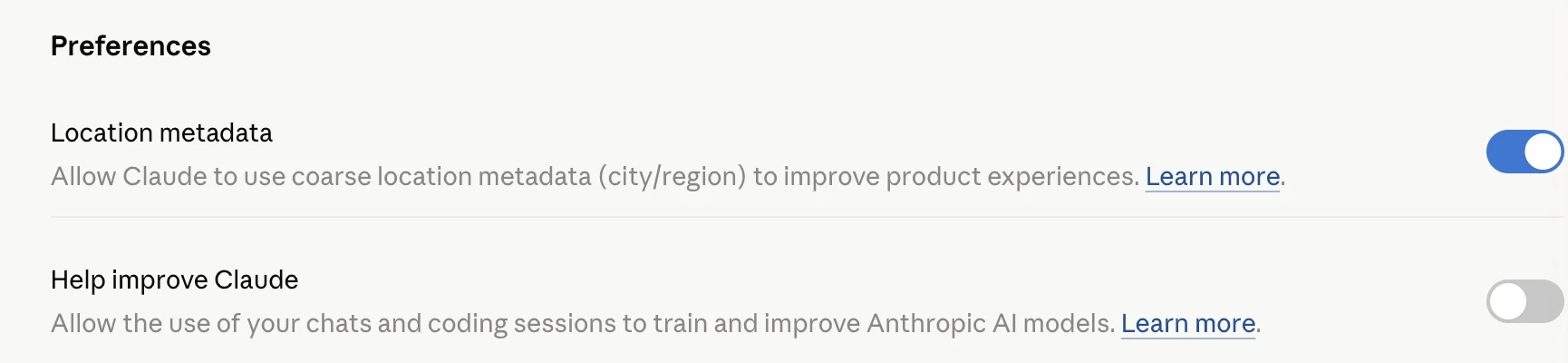
The Privacy panel holds a second toggle, for location, and a separate Memory control lives elsewhere. Both are distinct from the training setting above.
A second toggle, for location. This is a separate setting from the “Help improve Claude” training toggle. Anthropic “may use your IP address to determine coarse-grained location (city/region level)” for product features like web search, and you “can disable usage of location data to enhance product features like web search from your privacy dashboard.” A coarser country/region inference for compliance and anti-abuse “cannot be toggled off,” so turning the toggle off ends the city/region use but not all location inference. The docs don’t state whether the optional toggle is on by default.
Memory. Separate again from the training setting, with its own switch. Claude can build a memory from your chats: it summarizes your conversations and creates “a synthesis of key insights across your chat history” that is updated every 24 hours, kept separate from project memory, “stored with encryption at rest,” and available on all plans. The controls live at Settings → Capabilities: toggle it on or off, pause it, “View and edit memory” to see and change the stored summary, or “Reset memory,” which permanently “deletes all memories including project memories.” Check Settings → Capabilities to see whether memory is on. Retention isn’t its own number; memory “will be retained in accordance with existing chat data retention policies,” and it’s included in your data export.
Incognito is not the same as gone. Incognito chats aren’t saved to history or memory and aren’t used for training, even with model improvement on. They’re still retained: “while incognito chats aren’t saved to your chat history, they are retained for either 30 days (default), or longer in accordance with your organization’s custom data retention setting.” Incognito is about keeping a chat out of your history and out of training, not about leaving nothing on the servers.
Claude Desktop (macOS, Windows)
Governing terms: whatever account it’s signed into.
The documentation doesn’t carve out a separate desktop-app data policy, so there isn’t one to report. The desktop app is one of the Consumer Terms’ “associated apps, software, and websites,” which means a desktop app signed into a Free, Pro, or Max account behaves exactly like Claude.ai above: same 30-day floor, same 5-year window if training is on, same off switch at Settings → Privacy → “Help improve Claude.” Sign the desktop app into a commercial organization’s API key instead and commercial rules apply, by the same logic that governs Claude Code below. The thing to know about the desktop app is that it has no policy of its own; it inherits the account.
Claude Code (CLI)
Governing terms: the fork. This is the surface where consumer-versus-commercial is stated most plainly in the docs.
Training default, consumer plan. Off, opt-in only. On a Free, Pro, or Max account, Claude Code follows the same “Help improve Claude” toggle as Claude.ai, which starts off. Your coding sessions are used for training only if you’ve turned that toggle on: “We will train new models using data from Free, Pro, and Max accounts when this setting is on (including when you use Claude Code from these accounts).”
Training default, commercial key. Off, opt-in only. “Anthropic does not train generative models using code or prompts sent to Claude Code under commercial terms, unless the customer has chosen to provide their data to us for model improvement (for example, the Developer Partner Program).”
Where the training control lives. There’s no separate Claude Code training switch. On a consumer account the control is the account-level “Help improve Claude” toggle at Settings → Privacy, the same one that governs Claude.ai. The DISABLE_TELEMETRY and related environment variables below are telemetry only; they don’t touch the training setting either way.
Server retention. 30 days on a consumer plan; 30-day standard on a commercial key without a separate zero-data-retention arrangement.
The local cache most people never see. Claude Code keeps your sessions on your own disk: “Claude Code clients store session transcripts locally in plaintext under ~/.claude/projects/ for 30 days by default to enable session resumption.” Plaintext, on your machine, for 30 days. That’s a privacy surface separate from anything on Anthropic’s servers, and it’s configurable.
Telemetry is separate from training. Operational metrics, error reports, and the /feedback command are a different track from the training setting, and they have their own switches. “To opt out of telemetry, set the DISABLE_TELEMETRY environment variable.” Companions: DISABLE_ERROR_REPORTING, DISABLE_FEEDBACK_COMMAND, and CLAUDE_CODE_DISABLE_NONESSENTIAL_TRAFFIC to turn off the lot at once. Telemetry “does not include any code or file paths,” and the session-quality survey “cannot be used to train our AI models.” Turning off telemetry is not the same move as turning off training, and neither one turns off the other.
Feedback retention. Transcripts shared via /feedback are kept five years. If you answer “Yes” to the optional “can Anthropic look at your session transcript?” survey, “shared transcripts are retained for up to 6 months,” with API keys and tokens redacted; source code is uploaded as-is.
Zero data retention. Available, but not for everyone (see the API block). For Claude Code specifically, “Zero Data Retention (ZDR) is available for Claude Code when used through Claude for Enterprise.” A Free, Pro, or Max user can’t get it.
Claude in Chrome (extension)
Governing terms: your login. On a personal consumer login, consumer terms apply.
What’s collected. What Claude needs to act in the browser, which means the on-screen content it works with becomes part of the conversation. On a consumer login with training on, that’s eligible for training the same way a chat is; the consumer training article names “data collected when using Claude for Chrome” among what may be used. The off switch is the same “Help improve Claude” toggle.
Control beyond the toggle. Chrome adds a permission layer specific to acting on web pages. “Site-level permissions: Users can grant or revoke Claude’s access to specific websites at any time in the Settings.” This is access control, not training control; the two are separate.
Where not to point it. Whatever is on screen becomes part of the conversation, so the pages you open are the data you expose. Anthropic’s own guidance is “avoiding use of Claude in Chrome for sites that involve financial, legal, medical, or other types of sensitive information.”
Developer Platform / API (Console)
Governing terms: Commercial Terms (effective Jun 17, 2025) and the Privacy Policy. Same off-by-default training posture as consumer, with a different opt-in path and a zero-data-retention option the consumer side doesn’t have.
Training default. Off, opt-in only, and stated more strongly than on the consumer side. The commercial training article: “we will not use your chats or coding sessions to train our models, unless you choose to participate in our Development Partner Program.” The retention docs add: “retained data is never used for model training without your express permission.” Both sides are opt-in to train; here the opt-in is a business program you go and join, not a settings toggle.
Retention. 30-day standard. Some features keep data on their own clocks: API Batch processing is “29-day retention; async storage required,” code-execution containers retain up to 30 days, and uploaded “files retained until explicitly deleted.” Those three are not zero-data-retention-eligible, so an arrangement that promises ZDR doesn’t cover them.
Zero data retention, defined. ZDR means “customer data is not stored at rest after the API response is returned, except where needed to comply with law or combat misuse.” It’s the strongest retention posture Anthropic offers, and it’s not a consumer feature. The scope is explicit: “the only products to which zero data retention applies are eligible Anthropic APIs, and Anthropic products that use your Commercial organization API key (including Claude Code).” Safety-classifier results can still be retained even under ZDR. A Free, Pro, or Max user has no path to it.
How to control. Console account settings for data controls; ZDR and HIPAA handling are separate arrangements with Anthropic rather than a toggle.
Your rights, and the fine print
These apply across the consumer surfaces above. They’re the parts that aren’t a per-product toggle: how to get your data out, how to delete it, what the law gives you, and where it physically sits.
Getting your data out. Export from Settings → Privacy → “Export data” on the web app or Claude Desktop; it’s “not possible to run an export from Claude for iOS or Android.” Anthropic emails a download link that “will expire 24 hours after delivery,” and the export covers “conversation data and the user data for your account.”
Deleting it. Deleting a single conversation purges it from back-end storage within 30 days, covered above. Deleting your whole record, or exercising the formal rights below, runs through a request: “you or an authorized agent may submit a request by emailing us” at [email protected]. There is no documented one-click delete-account button.
Your formal rights. Under GDPR and CCPA the Privacy Policy lists rights to access and portability, deletion, correction, and objection. The policy makes its own caveat plainly: these rights “are limited, and that the process by which we may need to action your requests regarding our training dataset are complex.” So data already used in a trained model is not promised back frictionlessly. Contacts: [email protected], and the Privacy Policy also names a “Data Protection Officer” reachable at [email protected].
Where your data lives. Your data “may be transferred to our servers in the US, or to other countries outside the European Economic Area” and the UK. Where there’s an adequacy decision Anthropic relies on that; where there isn’t, it relies on “standard contractual clauses.” Region control is a developer-only feature: the API offers a data-residency setting via the “inference_geo API parameter,” but there is no consumer region-selection toggle.
Age. Anthropic “require[s] all users to be at least 18 years old to create and use a Claude account” and says it does not knowingly collect data from anyone under 18. Where age assurance runs, it goes through a third party, and “Anthropic never sees your ID or image; we receive only a pass/fail result.”
Legal requests, and the full vendor list. Anthropic says it discloses data only “in accordance with valid legal process (eg., a validly issued subpoena or warrant)” with an emergency exception, and that it will “provide users notice if their data is requested, unless we believe we’re legally prohibited from doing so;” for API or enterprise customers it routes the requester to the customer first. The full list of third-party sub-processors lives at the Trust Center.
What the policy reserves the right to do
Three reservations are written into the documents in plain language, so they’re worth reading as what they are: permissions Anthropic has granted itself, not predictions about hidden behavior.
On consumer surfaces, the model-improvement permission is broad by default and narrowed only by your opt-out: Anthropic “may use your Inputs and Outputs to train our models and improve our Services, unless you opt out.” The opt-out narrows it; the two carve-outs above are the part it doesn’t reach.
The safety-review carve-out is a standing exception to the off switch, with its own long retention. Content flagged by the trust-and-safety classifiers is kept regardless of your training setting, inputs and outputs for two years and classification scores for seven. The Usage Policy, which defines what gets flagged, applies to “anyone who can submit inputs”.
Training data also comes from outside your account. Anthropic’s web crawler operates under stated limits: “ClaudeBot does not access password protected pages or bypass CAPTCHA controls, and it respects ‘Do Not Crawl’ signals (robots.txt).” That’s the reservation working the other direction, a documented constraint rather than a permission.
The short version, if you use Claude everywhere
If you use Claude across several surfaces, the practical version fits in a few lines. On Claude.ai, Desktop, and Chrome with a personal login, your off switch is one toggle: Settings → Privacy → “Help improve Claude.” Leaving it off keeps new chats out of training and holds retention at 30 days; turning it on opts you into the 5-year window. Feedback you submit and content flagged for safety are used either way, so the off switch is a training control, not an eraser. Incognito keeps a chat out of your history and out of training but still leaves it on the servers for about 30 days. Memory has its own switch at Settings → Capabilities, and you can export everything from Settings → Privacy or delete it by emailing [email protected]. On the API, training is off by default the same way, nothing trained on without your express permission, with zero data retention available by arrangement that the consumer tiers can’t get. And Claude Code is whichever of those two worlds the account it’s running under belongs to.
Every link above was confirmed live on May 28, 2026. Policies on this topic change; the dates on each document are in the source links, and this page carries its own verified date at the top.