Everything below is what Google’s own documentation says it does with your data. It’s documented policy, the commitments written into the published privacy hubs and terms, not an independent audit of what runs on the servers. Where a claim matters, there’s a short quote and a direct link to the exact page so you can check it yourself. Every link was loaded and confirmed on June 1, 2026.
Google is harder to summarize than most, because there isn’t one Gemini and there isn’t one set of terms. The consumer app, the version inside Gmail, the thing on your Android phone, and the developer API each answer the privacy question differently, and Google tends to present all of it through a single account screen that makes it feel like one undifferentiated pile. It isn’t. One idea untangles almost all of it, so it goes first.
Three questions, not one
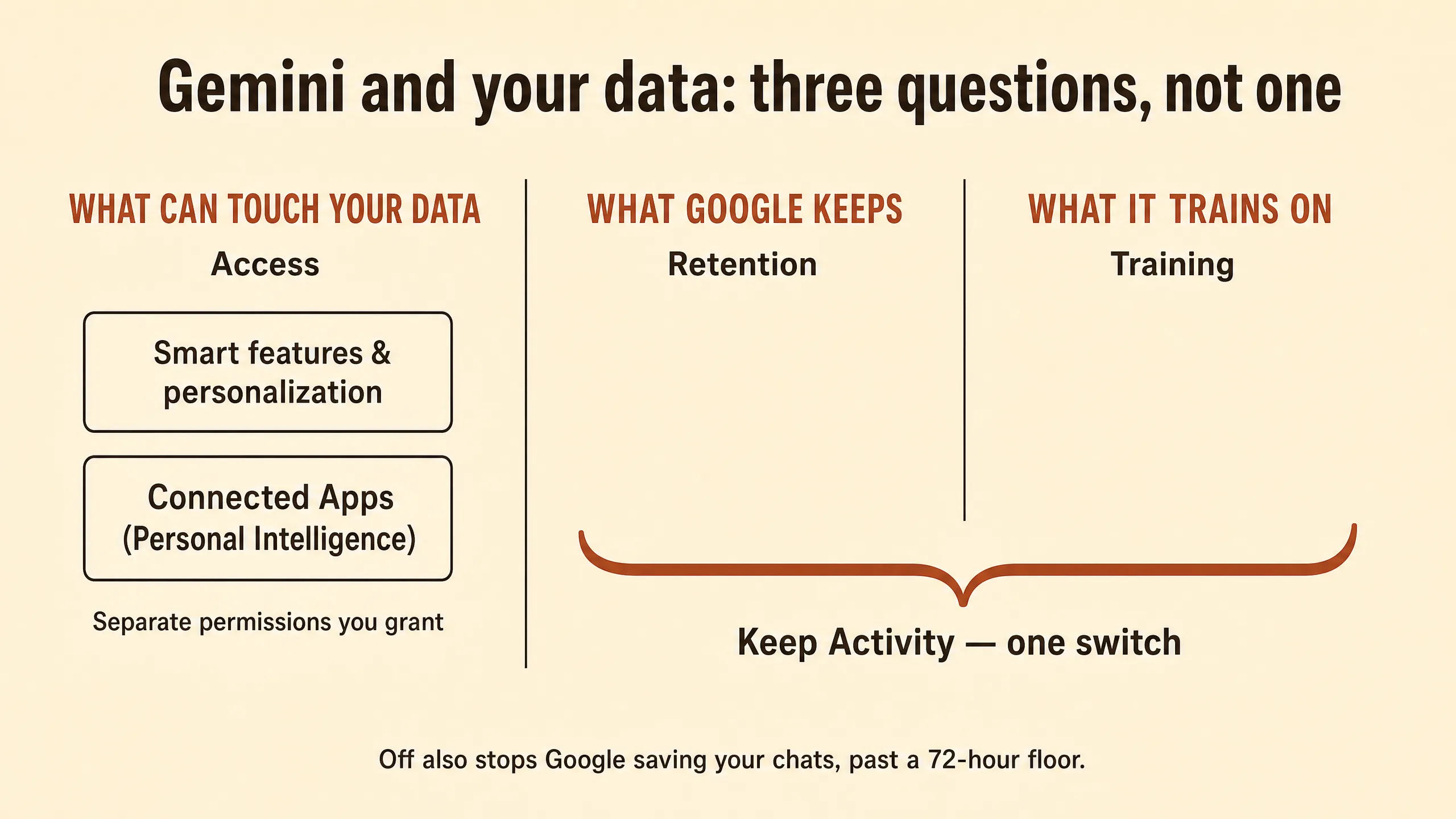
There are three separate questions hiding inside “is Gemini private,” and Google answers them in three different places with three different defaults.
The first is access: what can reach into your data and read it. The second is retention: what Google keeps a copy of, and for how long. The third is training: what gets used to improve Google’s models. These usually move together, which is why people treat them as one question. But they don’t have to move together, and on Gemini they often don’t. An app can read your messages without keeping them. Google can keep a chat without training on it. It can train on something derived from your Gmail without ever training on the Gmail itself. Each of those is a real, separate state with its own switch.
Ask any Gemini surface those three questions in order and the fog clears. Can it reach my data. Does Google keep it. Does it train on it. The rest of this page is those three questions, answered for each place Gemini shows up.
Three switches, three jobs
For the consumer Gemini app, three controls do most of the work, and they’re easy to confuse because they all live in your Google account and all sound like the same thing.
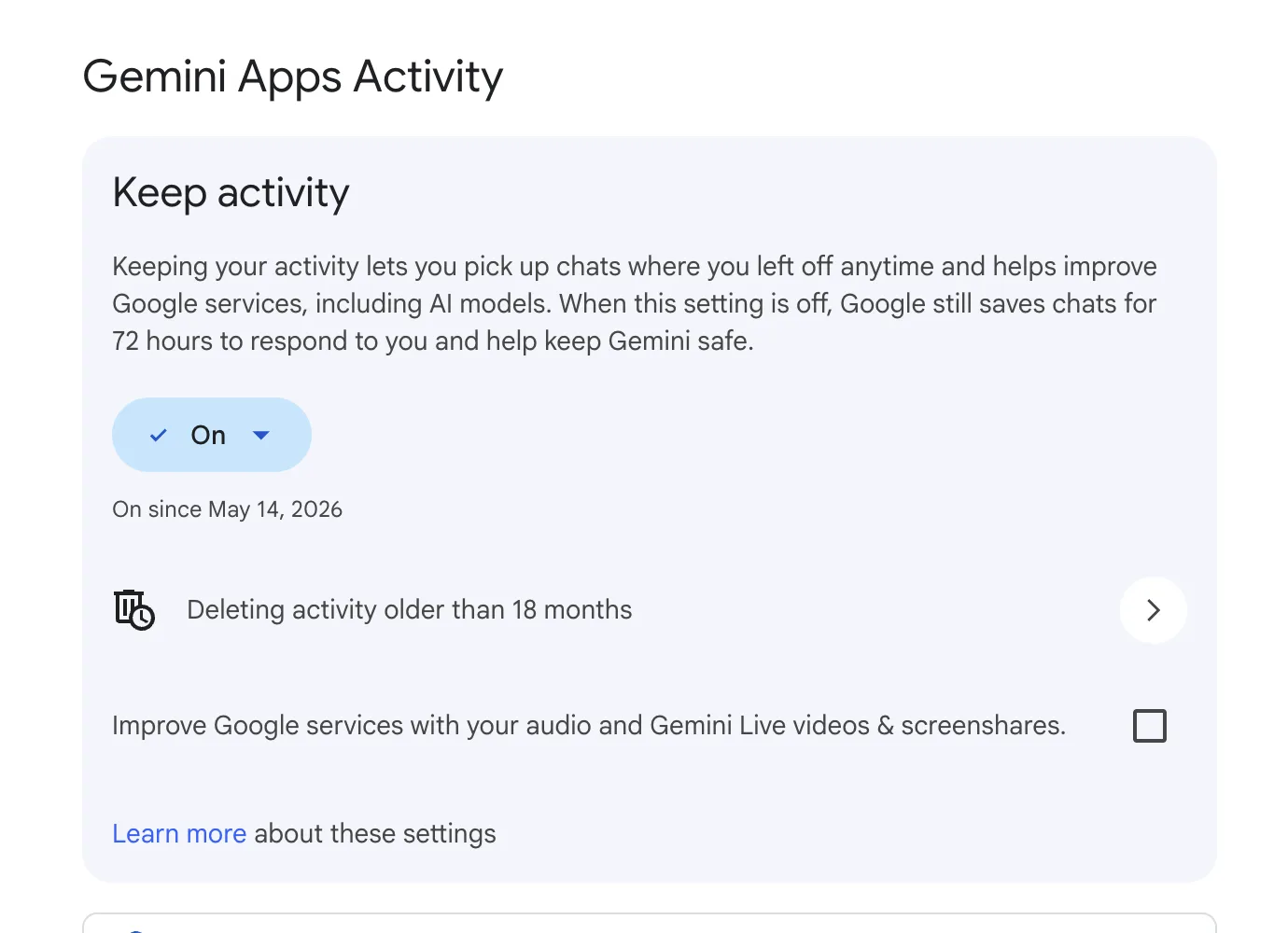
Keep Activity is the big one. It governs your Gemini app chats: whether they’re saved to your activity, whether they’re eligible for the human review described below, and whether they’re used to improve Google’s models. It used to be called Gemini Apps Activity, and it’s on by default. This is the switch most people mean when they ask how to make Gemini private.
The thing to notice is that the second and third questions, keep and train, are wired to this one switch. There is no “save my chat history but don’t train on it” setting on the consumer app: turning off training means turning off Keep Activity, which also stops Google saving your chats beyond the 72-hour floor described later. That bundling is a Google-specific choice; some major assistants let you stop training while keeping your history, and Gemini doesn’t.
Search Services History (formerly Web & App Activity) is a different, account-wide setting, and it’s the one that governs Search’s AI features, not the Gemini app. People turn off Keep Activity, assume they’ve covered everything, and miss that AI Overviews and AI Mode in Search run off this separate toggle. More on that boundary at the end.
Smart features and personalization is the gate for Gemini reaching into Gmail, Docs, and the rest of Workspace. Without it on, Gemini in those products has nothing to work with. Its default depends on where you live, which is the first place the US-versus-Europe split shows up: Google’s wording is that “by default, smart feature settings are off if you live in: The European Economic Area, Japan, Switzerland, United Kingdom.” Everywhere else, including the US, it’s available and on.
| Switch | What it governs | Default |
|---|---|---|
| Keep Activity | Gemini app chats: saved, human-reviewed, trained on | On (US); off for temporary chats |
| Search Services History (formerly Web & App Activity) | Search AI features (AI Overviews, AI Mode) | On (US) |
| Smart features and personalization | Gemini access to Gmail, Docs, Workspace | On (US) / off (EEA, Japan, Switzerland, UK) |
You find Keep Activity at myactivity.google.com under the Gemini Apps section, where you can also set how long activity is kept before it auto-deletes.
When Gemini reaches into your Gmail, Drive, and Photos
This is the connection people find most unnerving, and it’s also where the access-versus-training distinction matters most.
When you connect apps through what Google calls Personal Intelligence, Gemini can read across your Gmail, Drive, Calendar, and Photos to answer questions that span them. It’s opt-in, you turn each connection on yourself, and it’s excluded in the EEA. So far that’s access: the connection lets Gemini reach the data.
Training is the separate question, and here Google draws a line that’s easy to state wrong. Google does not train its general models on the raw contents of your inbox or photo library. Its words: “Gemini does not train generative AI models directly on your Gmail inbox, Drive, Contacts, Calendar or other Workspace apps or on imagery or audio from your Google Photos library.” That’s the sentence that gets quoted as “Gemini doesn’t train on your Gmail,” and as far as it goes it’s true.
It doesn’t go as far as it sounds, though, because the next thing Google says is that it trains on what gets derived from that content: “To make our responses relevant, helpful, and high quality, we train our generative AI models off of these summaries, excerpts, generated media, and inferences.” The “these” refers to the summaries, excerpts, generated media, and inferences Gemini produces from your emails, files, and photos when it answers you. So the raw email isn’t in the training set, but a summary of it, an excerpt from it, an image generated from it, or a conclusion drawn about you from it can be. For most people the practical content of an email and a faithful summary of that email are not very far apart, which is the part the short version leaves out.
Human review applies here too. Google’s wording: “a subset of Connected Apps data processed by Gemini is reviewed by human reviewers (including trained service providers) to debug our services, help keep them safe, and improve them.”
Ask Photos, the photo-library version of this, is the one place the defaults run the other way, and it’s also the one consumer surface with a dedicated human-review opt-out. Per Google, “human reviewers don’t review Ask Photos responses, unless you give feedback, or in rare cases to address abuse or harm,” and “you can at any time opt out of human review of your Ask Photos queries.” Same company, narrower default and its own off-switch, because the data is more sensitive. Worth knowing if photos are your concern specifically.
The Android question, where access and retention come apart
If you want one example that proves the three questions are really separate, it’s this one.
Since July 7, 2025, Gemini on Android can act on your Phone, Messages, WhatsApp, and Utilities even when Keep Activity is off. Google’s own line, as reported when it emailed users about the change, is that Gemini can “use Phone, Messages, WhatsApp, and Utilities on your phone, whether your Gemini Apps Activity is on or off.” (This date comes from Android Police quoting Google’s notification email; Google’s consumer privacy pages describe the behavior but don’t pin the date.)
Run that through the three questions and it gets precise instead of alarming. Access is on. The app can reach those services to do what you ask, like sending a message or setting a timer. Keep Activity doesn’t touch access. What it touches is retention: with it off, Google’s position is that those interactions aren’t saved to your activity or used to train models, beyond the 72-hour floor described next. So two sentences are true at the same time. Gemini can use your messages with Activity off, and Gemini isn’t keeping your messages with Activity off. They answer different questions. The switch you flipped controls keeping, not reaching. Reaching was granted earlier, by the app permission you gave when you first let Gemini onto the phone.
What turning it off doesn’t cover
Turning off Keep Activity does what it says, in Google’s wording: “If Keep Activity is off and you don’t submit feedback, Google also does not use your future chats to improve its AI models.” Three things keep running anyway, and they’re worth stating plainly because the off-switch language can read as more total than it is.
The 72-hour floor. Even with Keep Activity off, “temporary chats and chats you have when Keep Activity is off are retained with your account for 72 hours” (source). That’s a short safety-and-abuse window, not a training pool, but it means “off” is a three-day floor, not zero. And human review can still happen inside it: even with Keep Activity off, the page states, “Google still uses your chats to respond to you and help protect Google, our users, and the public, including with help from human reviewers.” Off stops review-for-improvement and training; it doesn’t promise no human ever sees a chat in that safety window.
No separate human-review switch. This is the answer to a question people ask directly: is there a way to turn off human review on its own. On the consumer Gemini app, no. Review eligibility is bundled into Keep Activity, so the only way to stop chats being reviewed to improve Google’s services is to turn Keep Activity off, which also stops Google saving your history past the 72-hour floor. The one documented exception is Ask Photos, which has its own dedicated control, covered above.
The three-year human-review copy. A subset of chats gets read by human reviewers, and those copies live on a separate clock that your delete button doesn’t reach. Google’s wording: “Chats reviewed by human reviewers (and related data like your language, device type, location info, or feedback) are not deleted when you delete your activity. Instead, they are retained for up to three years.” This is the single most counterintuitive fact on the page. Deleting your activity, and even setting auto-delete to its shortest setting, does not pull back a chat that’s already been routed to a reviewer. Those are held for up to three years, disconnected from the rest of your activity.
The audio asymmetry. Gemini’s text chats are used for improvement by default when Keep Activity is on, but the live audio and video aren’t. Per the same page: “Your Gemini Live audio, video and screenshares are not used to improve Google services by default.” So the more invasive-sounding input, your voice and camera, is opt-in, while text is opt-out. Two opposite defaults for two kinds of input, which looks contradictory until you notice Google simply made a different call for each.
None of this is a reason to avoid Gemini. It’s the actual shape of “off,” so that off means what you think it means.
Every consumer surface, and what it does by default
Same three questions, answered per surface. The auto-delete default for saved activity, separately, is 18 months, adjustable. Per Google, you can “choose how long your Gemini Apps activity is kept (3, 18, or 36 months) or select Don’t auto-delete activity.” That 18-month clock does not shorten the 3-year human-review retention, which is a different bucket.
| Surface | Governed by | Trained on by default? | Human review? |
|---|---|---|---|
| Gemini app, Live, Gems, Gemini in Chrome, Android | Gemini Apps Privacy Notice | Yes, if Keep Activity on (the default) | Yes, a subset |
| Connected apps (Gmail, Drive, Photos via Personal Intelligence) | Gemini Apps Notice + Google Privacy Policy | Derived content yes; raw content no | Yes, a subset |
| Gemini Live audio / video / screenshare | Gemini Apps Privacy Notice | No, opt-in | Only with feedback |
| Ask Photos | Photos privacy notice | No, outside Photos | Only with feedback or abuse |
| Gemini in Workspace (work or school account) | Workspace Terms + Cloud Data Processing Addendum | No | No |
| Search AI Overviews / AI Mode | Google Search terms (Search Services History) | Separate from Gemini hub | Per Search terms |
The age floors, for completeness: personal and school accounts require you to be 13 or the local equivalent, work accounts require 18, under-13s can get supervised access through Family Link, and Gemini Apps “are not available for supervised accounts in the European Economic Area, Switzerland, and the United Kingdom.”
If you build on Gemini
If you’re calling Gemini from code rather than typing into the app, you’re in a different world with the same three questions, and the answers split cleanly along one line: whether you’re paying.
Free tiers train. Google says so directly. On AI Studio and the unpaid Gemini API, per Google’s API terms, “Google uses the content you submit to the Services and any generated responses to provide, improve, and develop Google products and services and machine learning technologies.” There’s no opt-out toggle for this. The only exit is enabling billing. Human reviewers are in the loop, with the data de-identified first: “this includes disconnecting this data from your Google Account, API key, and Cloud project before reviewers see or annotate it” (source). And Google states the obvious implication itself: “do not submit sensitive, confidential, or personal information to the Unpaid Services” (source). Treat the free tier as a place to prototype with throwaway data, not to process anyone’s real information.
Paid Gemini API doesn’t train. Turn on billing and the posture flips. Google’s terms: “Google doesn’t use your prompts (including associated system instructions, cached content, and files such as images, videos, or documents) or responses to improve our products.” What remains is abuse monitoring, and it’s short: Google retains data “for fifty-five (55) days for the purposes of detecting and preventing violations of the Prohibited Use Policy.” So paid is no-training, with a 55-day safety log. Not zero, but not a training pool.
Vertex AI never trains by default, for everyone on it, free trial or not, because it’s the Google Cloud enterprise surface. Per the data-governance docs: “Google won’t use your data to train or fine-tune any AI/ML models without your prior permission or instruction.” Its abuse logs run on a 90-day clock rather than 55 days, and they stay in your region: prompt logs are “stored securely for up to 90 days in the same region or multi-region selected by the customer for their project”. Two more Vertex specifics worth pinning. Cached request data is in-memory only, isolated per project, and short-lived: it “has a 24-hour TTL”. And abuse logging only applies to a defined set of customers: “only customers whose use of Google Cloud is governed by the Google Cloud Platform Terms of Service are subject to prompt logging” for abuse monitoring.
Three numbers, three surfaces, and they are not interchangeable. 55 days is the paid Gemini API abuse window. 90 days is the Vertex abuse window. Separately, Grounding with Google Search keeps its own 30-day bucket: Google stores grounding prompts and outputs “for thirty (30) days for the purposes of creating grounded results and search suggestions”. Mixing these up is the most common mistake in writing about this, so keep each pinned to its surface.
A few more things builders run into:
- Zero data retention on Vertex is available on request and removes the abuse-logging copy, but it can’t turn off the storage tied to Search and Maps grounding. If you need a hard no-retention guarantee, that grounding carve-out is the one to read closely.
- Europe gets paid terms for free. Per Google’s API terms: “If you’re in the European Economic Area, Switzerland, or the United Kingdom, the terms under ‘How Google uses Your Data’ in ‘Paid Services’ apply to all Services, including Google AI Studio and unpaid quota in the Gemini API, even though they are offered free of charge.” So the free-tier-trains rule simply doesn’t apply in those regions.
- The free Code Assist individual tier behaves like the free API. Its privacy notice says it collects “your prompts, related code, generated output, code edits, related feature usage information, and your feedback,” that “human reviewers may read, annotate, and process the data collected above,” and that disconnected copies are kept “for up to 18 months.” Same 18-month number as the consumer auto-delete default, completely unrelated thing.
- One dated note so this doesn’t quietly age: on June 18, 2026, per Google’s developer blog, “Gemini CLI and Gemini Code Assist IDE extensions will stop serving requests for Google AI Pro and Ultra, as well as those using it free of charge using Gemini Code Assist for individuals,” moving to the Antigravity CLI. If you’re reading this after that date, the command-line tooling has changed name and shape; the data terms above are the ones to re-check against whatever replaced it.
Two surfaces that aren’t what they look like
Search AI is a different thing. AI Overviews and AI Mode in Google Search look like Gemini and often use the same models, but they’re governed by Google Search’s terms and a separate account-wide setting, not the Gemini Apps Privacy Notice or Keep Activity. Google does use your Search interactions to train its generative AI models, and there is a documented opt-out: turning off Search Services History. Per Google: “When Search Services History is off, your future activity won’t be used to train Google’s generative AI models, unless you provide feedback.” That “unless you provide feedback” carve-out is the honest limit on how total the off is. Note the name: this control was previously Web & App Activity, which Google is currently splitting into Search Services History and Personalized Recommendations, so mid-rollout you may still see the old label on your account screen. Either way it’s a separate lever from your Gemini chats. So turning off Keep Activity does nothing for Search AI, and turning off Search Services History does nothing for your Gemini app chats. Two switches, two surfaces.
Work or school accounts are a separate regime. If your Gemini is inside a Google Workspace account your employer or school manages, your data is customer data under the Cloud Data Processing Addendum, and the training answer flips to no. Per the Workspace privacy hub: “Workspace does not use customer data for training models without customer’s prior permission or instruction,” and “your content is not human reviewed or used for Generative AI model training outside your domain without permission.” Gemini in Gmail, Docs, and the rest, per Google, “uses your content in Google Workspace to provide more useful responses to your prompts and doesn’t use your content to train or improve Gemini or other generative AI models.” Whether any of it is even turned on, and what’s logged, is your admin’s call, not yours. For organizations operating under a Business Associate Agreement, Google lists the Gemini app (excluding Gemini in Chrome), the Gemini Mac app, and Gemini in Workspace as HIPAA Included Functionality, so those are the surfaces a covered Workspace deployment can rely on. If the data is sensitive, that’s the person to ask.
The short version
Anything you do with Gemini has three answers, not one. What can reach the data, what Google keeps, and what it trains on are separate questions with separate switches. On the consumer app, the switch is Keep Activity, on by default, and turning it off stops future chats from training models but leaves a 72-hour floor, a human-reviewed copy held up to three years that your delete button doesn’t reach, and Android app access that runs regardless. Gemini doesn’t train on your raw Gmail or photos, but it does train on summaries, excerpts, generated media, and inferences drawn from them. If you build on it, the free API and AI Studio train and you exit only by enabling billing; paid doesn’t train and keeps a 55-day safety log; Vertex never trains by default and keeps a 90-day one in your region; Europe gets the paid terms even on free. And Search’s AI is a different product on a different switch entirely.
Every link above was confirmed live on June 1, 2026. Policies on this topic change often; the effective dates are on each linked page, and this article carries its own verified date at the top.
Infographic by gpt-image-2 (OpenAI, via OpenRouter). The Keep Activity screenshot is a real capture.