Everything below is what OpenAI’s own documentation says it does with your data. It’s documented policy, the commitments in the published terms and help articles, not an independent audit of what runs on the servers. Where a claim matters, there’s a short quote and a direct link to the exact policy so you can check it yourself. Every link was loaded and confirmed in a browser on May 28, 2026.
One distinction decides almost everything else, so it goes first.
The line that decides what happens to your data
OpenAI runs two sets of terms, and which one governs you depends on the surface you’re signed into, not on the model underneath it.
This is the place OpenAI’s posture differs from itself, and it’s worth being precise about. Consumer ChatGPT trains on your conversations by default; data sent through the API is not trained on at all unless you opt in. Same company, opposite starting points, and which one applies to you is decided entirely by whether you’re on a personal ChatGPT login or a developer account.
Consumer terms cover ChatGPT on a Free, Plus, Pro, or Go account, the desktop app signed into one of those, the Atlas browser on a personal login, and Codex run from a ChatGPT plan. Here training is on by default. OpenAI’s own wording: ChatGPT “improves by further training on the conversations people have with it, unless you opt out.” The off switch is a single setting, covered below.
Commercial terms cover the API, the Platform, and the business plans. Here training is off by default and you’d have to opt in. The Services Agreement is contractual about it: OpenAI “will not use Customer Content to develop or improve the Services, unless Customer explicitly agrees to such use.” The API data doc puts a date on it: “As of March 1, 2023, data sent to the OpenAI API is not used to train or improve OpenAI models (unless you explicitly opt in to share data with us).” The consumer Privacy Policy confirms the wall between the two: it “does not apply to content that we process on behalf of customers of our business offerings, such as our API.”
Two surfaces sit on the line and can go either way: Codex and the desktop app. Codex run from a Plus or Pro plan is governed by consumer terms; pointed at an organization’s API account, it’s governed by commercial terms. The desktop app follows whatever account it’s signed into. That fork changes the answer to every question that follows.
It comes down to two sets of terms
The surface you use decides which set governs you. Here’s what each one does by default, and where they part ways.
| Consumer ChatGPT | Commercial / API | |
|---|---|---|
| Which surfaces | ChatGPT (Free/Plus/Pro/Go), Desktop and Atlas on a personal login, Codex on a ChatGPT plan | Developer Platform / API, business plans, Codex on an API account |
| Trained on by default? | Yes. Opt out. | No. Opt in only. |
| How you’d change it | The “Improve the model for everyone” toggle | A business arrangement, not a toggle |
| Retention | 30 days after you delete (90 for the agent; 7 for Atlas browser memories) | 30 days of abuse-monitoring logs; zero data retention available by arrangement |
| Human review | Abuse monitoring, plus model-improvement review if training is on; safety-flagged content either way | Abuse monitoring; otherwise only by arrangement or safety |
| Deleting / control | Delete a chat (30-day purge); Settings → Data Controls | Console controls; ZDR by arrangement |
Now each surface in full. Same fields every time, so you can jump to yours and find the same shape.
ChatGPT (Free, Plus, Pro, Go)
Governing terms: Consumer Terms of Use (effective Jan 1, 2026) and the US Privacy Policy (updated May 18, 2026). The US version is the most recently updated of the regional privacy policies; the retention, training, and opt-out substance is the same across regions, and the US-only ads provisions are covered near the end.
What’s collected. Your prompts and ChatGPT’s responses, account data, saved memories, and custom instructions.
Training default. On. OpenAI “may use your content to train our models” when you use ChatGPT, and the binding consumer Terms say the same with the escape hatch attached: “If you do not want us to use your Content to train our models, you can opt out by following the instructions in this article.” Opting out covers new conversations going forward, not ones already used.
Retention. Your chats stay until you delete them. Delete one and “the chat is removed from your account immediately and scheduled for permanent deletion from OpenAI systems within 30 days”, unless it’s been de-identified already or OpenAI has a legal or security reason to keep it. Turning training off doesn’t delete anything; “Your conversations will still appear in your chat history but won’t be used to train ChatGPT.”
Human review. Content flagged by abuse monitoring can be reviewed regardless of your settings. If training is on, your conversations are also in the model-improvement pool. OpenAI’s note: it takes “steps to reduce the amount of personal information in our training datasets before they are used to improve and train our models.”
Deletion. Delete a single chat in the app, or delete your account, and the 30-day purge above applies. Once it’s gone you can’t get it back: “Once you delete a chat, you cannot recover it.” Archiving only hides a chat from the sidebar; archived chats “follow the same retention rules as unarchived chats.”
How to control. Settings → Data Controls → turn off “Improve the model for everyone.” OpenAI’s path for a signed-in web user: “Click your profile icon”, select Settings, go to Data Controls, and turn off the toggle named “Improve the model for everyone.” The setting syncs across your devices, and you can change it anytime with “no restrictions.” There’s also a portal route at privacy.openai.com, where you can click “do not train on my content.”
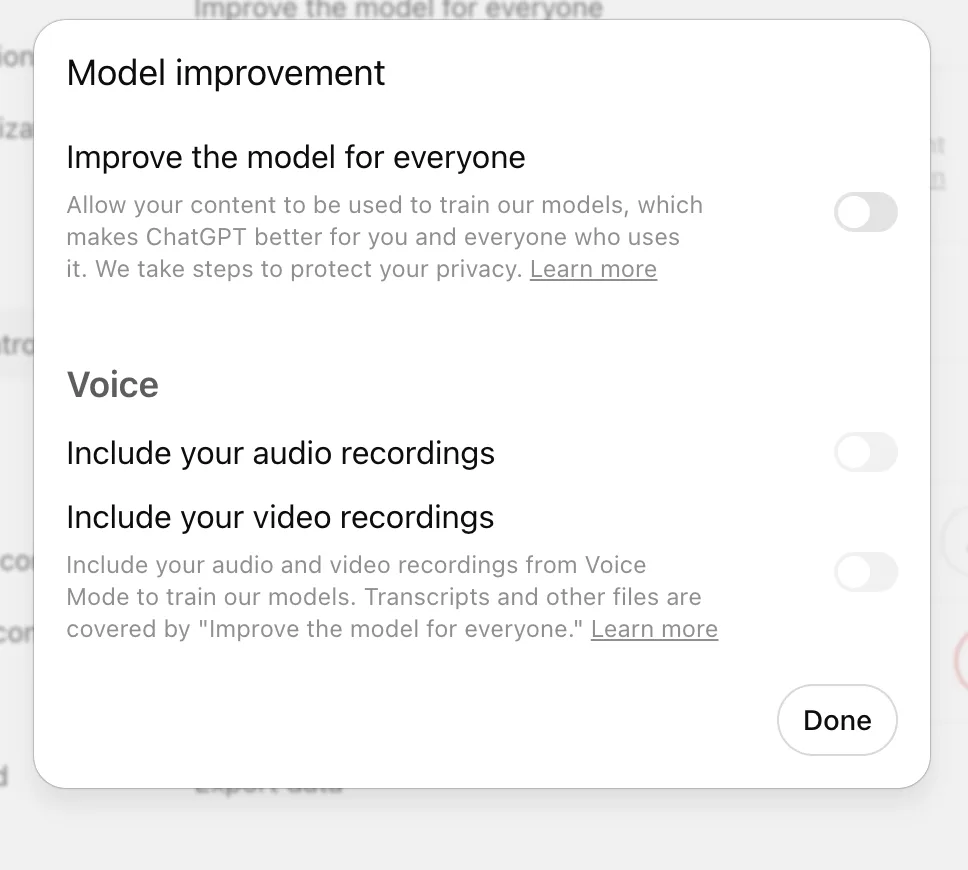
What turning training off does not reach. Two things keep flowing after you turn the toggle off. Feedback is one: even after you opt out, if you rate a response, “the entire conversation associated with that feedback may be used to train our models.” Safety is the other: turning off Memory and Personalization “does not disable safety features that may use limited, safety-relevant context in rare, high-risk situations.” So “opted out” means “new chats aren’t used for training,” not “nothing is ever touched.”
Temporary Chat. The pill-shaped “Temporary” button in the top-right starts a chat that leaves no history. These chats “won’t appear in history, use or create memories, or be used to train our models.” Temporary is not the same as nothing-stored, though. For safety, OpenAI “may still keep a copy for up to 30 days,” and the help center notes such chats “May be reviewed only to monitor for abuse.” Your custom instructions still apply inside a Temporary Chat.
Memory. Two settings, both at Settings → Personalization: “Reference saved memories” (the things you’ve explicitly asked ChatGPT to remember) and “Reference chat history” (details pulled from past chats). Memory is trained on when the consumer toggle is on, and OpenAI says so plainly: with “‘Improve the model for everyone’ setting turned on, we may use content you’ve shared with ChatGPT, including past chats, saved memories, and memories from those chats, to help improve our models.” The deletion catch worth knowing: saved memories live separately from your chats, so “even if you delete a chat, any saved memories from it can still be used in future conversations.” To clear them, delete them in Settings → Personalization. Turn off “Reference chat history” and what ChatGPT remembered from past chats is “deleted from our systems within 30 days.”
ChatGPT Desktop (macOS, Windows)
Governing terms: whatever account it’s signed into.
The documentation doesn’t carve out a separate desktop data policy, so there isn’t one to report. Signed into a consumer account, the desktop app behaves exactly like ChatGPT above, with the same off switch at Settings → Data Controls. What’s distinctive is “Work with Apps,” the macOS feature that lets ChatGPT read your other open apps. When it’s on, ChatGPT “includes the full content of open editor panes in the foremost window, up to a truncation limit” for editors, and for terminals it “includes the last 200 lines of open panes.” That content “becomes part of your chat history” and follows the same 30-day deletion rule, and it’s trained on if your toggle is on. The feature runs through the macOS Accessibility permission, so you can switch it off by flipping “the ‘Enable Work with Apps’ switch in ChatGPT settings” or by revoking that permission. The thing to know about the desktop app is that it has no policy of its own; it inherits the account.
ChatGPT agent and the Atlas browser
Governing terms: the account you’re signed into. On a personal login, consumer terms; the same training toggle applies.
This is the surface that has moved the most. Operator, OpenAI’s earlier standalone browsing agent, is gone: its “functionality is now integrated into ChatGPT agent mode. The Operator website is no longer accessible.” The two current agent surfaces are ChatGPT’s built-in agent mode and the Atlas browser.
ChatGPT agent. It works by taking screenshots of a virtual browser to see and click pages. Those screenshots and the agent’s browsing history live in your conversation until you delete it, and deleting the chat deletes the screenshots. The retention number here is the one not to flatten: it isn’t 30 days. “Deleted chats and associated screenshots will be deleted from our systems within 90 days.” When a task needs a login, the agent hands you the wheel, and while you control the browser, “screenshots are not captured,” which keeps your password out of the capture. On Plus and Pro the screenshots are trained on if you’ve left training on; on Business, Enterprise, and Edu, “we do not use your business data for training our models, including data accessed during agent mode sessions.”
Atlas browser. Atlas is OpenAI’s own browser with ChatGPT built in, the closest thing it has to a browser extension that acts on pages. It adds a second training control. The main toggle governs Atlas chats the same as any chat; a separate “Include web browsing” toggle governs whether the pages you browse get used for training, and that one “is off by default.” Atlas can also build “browser memories” from what you read, and those run on their own short clock: “We delete web contents right after they are summarized, and delete the privacy-filtered summaries within 7 days.” Atlas incognito keeps a session out of your account but isn’t invisible; signed-out chats are retained “separate from your account for 30 days to detect and prevent abuse.”
OpenAI API / Platform (Console)
Governing terms: the Services Agreement (updated Dec 1, 2025) and a data processing addendum. This is the off-by-default side of the line.
Training default. Off, opt-in only, and dated. OpenAI “will not use Customer Content to develop or improve the Services, unless Customer explicitly agrees to such use,” and data sent to the API “is not used to train or improve OpenAI models” unless you opt in, a posture in place since March 1, 2023. There’s no toggle here; opting in is a business arrangement.
Retention. Inputs and outputs aren’t kept as training data, but abuse-monitoring logs are kept short: “abuse monitoring logs are generated for all API feature usage and retained for up to 30 days, unless longer retention is required by law.” Some features keep their own application state on their own clocks; the data doc has a per-endpoint table for it.
Human review. Abuse-monitoring logs exist to enforce the usage policies, and approved customers can reduce or eliminate that logging (see below). Otherwise the API isn’t reviewed for model improvement unless you’ve opted in.
Deletion. API logs purge on the 30-day window above. If a business contract ends, “OpenAI will delete all Customer Content from its systems within thirty days,” absent a legal-retention or written-agreement exception.
Zero data retention. This is the strongest API posture, and it’s not self-serve. Zero Data Retention and Modified Abuse Monitoring “are subject to prior approval by OpenAI” and arranged through sales, then configured at Settings → Organization → Data controls. ZDR has one notable exception even when it’s on: image and file inputs “are scanned for CSAM content upon submission,” and a detected hit “will be retained for manual review, even if Zero Data Retention or Modified Abuse Monitoring is enabled.” Consumer ChatGPT users have no path to ZDR.
Data residency. The API offers regional storage and, for some regions, regional processing, “charged a 10% uplift” on the current top models. Using any region other than the US requires being approved for abuse-monitoring controls and executing a zero-data-retention amendment. There is no consumer region-selection setting.
Codex (app, CLI, IDE, web)
Governing terms: the fork again, stated cleanly. “When you sign in to Codex using an existing ChatGPT account, the ChatGPT Terms of Use and Privacy Policy—or the corresponding online services agreement for OpenAI API and ChatGPT Enterprise, Education or Business Users—apply.”
Training default. Whatever the account it inherits. On Plus or Pro, conversations “may be used to improve models unless you turn off training in ChatGPT data controls,” and that includes screenshots taken by Computer Use. On a business or Enterprise account, Codex isn’t trained on by default, same as the rest of the commercial side.
Two training surfaces, not one. The inherited ChatGPT toggle covers Codex conversations, but it isn’t the whole story. Codex “has separate controls for allowing training on full environments, which you can manage in the Codex Settings,” and changing the ChatGPT toggle “will not affect these full-environment Codex settings.” So a Codex user has two places to look, not one.
Retention and control. Codex follows the retention of the account it inherits: the 30-day consumer purge on a ChatGPT plan, the API rules on a business account. ChatGPT and Codex conversations are kept separate from each other, though some connected services carry between them; connect Google Drive in ChatGPT and “it will also be available in Codex,” and you can disconnect it anytime.
Your rights, and the fine print
These apply across the consumer surfaces. They’re the parts that aren’t a per-product toggle.
Getting your data out, and deleting it. You can export your ChatGPT history from your account’s data controls, and you can delete individual chats or your whole account from Settings → Data Controls. Deleting runs the 30-day purge above.
Your formal rights. For access, correction, deletion, portability, and the rest, OpenAI points you to its privacy portal: submit requests “through privacy.openai.com or to [email protected].” The data-protection officer is reachable at [email protected]. The same channel handles the unusual-but-real case of asking OpenAI to correct factually wrong model output about you.
Where your data is processed. For users outside Europe the data controller is OpenAI OpCo, LLC in San Francisco; for the EEA and Switzerland it’s OpenAI Ireland. Region control of where data is stored is a developer-only feature, the API data-residency option above; there’s no consumer setting for it.
The vendor list. OpenAI’s Trust Portal publishes its certifications (SOC 2, the ISO 27000 family, ISO 42001, PCI DSS, FedRAMP, and more). The subprocessor list, the actual third parties that touch your data, sits behind an access request on that portal rather than on a public page, so unlike some vendors there’s no public link to hand you.
The New York Times order, and what’s left of it. For a stretch of 2025, a court order in the NYT lawsuit forced OpenAI to retain consumer ChatGPT and API data that would normally have been deleted. That broad order has ended. OpenAI’s statement: “we are no longer under a legal order to retain consumer ChatGPT and API content indefinitely. Our obligations under the earlier order ended on September 26, 2025,” and standard 30-day deletion resumed. A new court order terminated the going-forward preservation requirement in October 2025. What remains is narrow: a locked, segregated copy of “limited historical April–September 2025 user data” from the period the order covered, with European, Swiss, and UK conversations excluded, plus any accounts the Times specifically flags. Enterprise, Edu, and zero-data-retention API customers were never affected. The practical read for a consumer today: delete now means the 30-day purge, with that one older window held aside for the case.
Age. OpenAI’s terms require you to be “at least 13 years old,” and the Privacy Policy adds that users “under 18 must have permission from their parent or guardian.”
Ads, if you’re a US Free or Go user. OpenAI began a US ads test on February 9, 2026, on Free and Go plans only; Plus, Pro, Business, Enterprise, and Edu stay ad-free. Personalized ads can draw on your current thread, past chats, and memory, but the boundary is firm on the advertiser side: “Advertisers do not have access to your chats, chat history, memories, or personal details,” and get only aggregate numbers like views and clicks. Ads don’t appear in Temporary Chat, when you’re logged out, after image generation, or in Atlas. The controls are at Settings → Ad Controls, and the US Privacy Policy adds a state-law opt-out for what it calls “‘targeted advertising’ or sharing for ‘cross-context behavioral advertising’” under certain state laws. The EU and rest-of-world policies don’t carry the ads provisions.
What the policy reserves the right to do
A few permissions are written into the documents in plain language, worth reading as what they are: things OpenAI may do, not predictions about hidden behavior.
On the consumer side, the training permission is the default and your opt-out narrows it; the feedback and safety carve-outs above are the parts the opt-out doesn’t reach. On the business side, the reservation runs the protective direction: OpenAI “will only use Customer Content as necessary to provide… the Services, comply with applicable law, enforce the OpenAI Policies, and prevent abuse,” which is a limit on use rather than a grant. Across both, the security-and-legal exception lets OpenAI keep data “longer for legitimate security, safety, or legal reasons” when content is banned for policy violations or a subpoena lands. And the CSAM scan on API uploads is the one retention that survives even zero data retention.
The short version, if you use ChatGPT everywhere
If you touch several OpenAI surfaces, the practical version is short. On ChatGPT, the desktop app, and Atlas with a personal login, your off switch is one setting: Settings → Data Controls → “Improve the model for everyone.” Leaving it on means your chats and memories train models; turning it off stops that for new chats but not for feedback you submit or content flagged for safety. Deleting a chat starts a 30-day purge, and “delete” is permanent once it runs. Temporary Chat skips history and training but still leaves a 30-day safety copy. The agent’s screenshots purge on 90 days, not 30, and Atlas browser-memory summaries last 7. On the API, nothing is trained on unless you opt in, and zero data retention is available by arrangement that consumer accounts can’t get. Codex is whichever of those two worlds the account it’s running under belongs to, with a second training switch in its own settings. And the old New York Times retention order has lifted, so today “deleted” means deleted on the usual clock, except for one held-aside 2025 window.
Every link above was confirmed live on May 28, 2026. Policies on this topic change often; the dates on each document are in the source links, and this page carries its own verified date at the top.