Ask free ChatGPT to write you a complaint email about a broken heater, in the one line you’d actually type, and you get a perfectly polite template with the real parts left blank: [date], [phone number], [Your Name], [Address/Unit Number]. It even ends by asking for the things you didn’t tell it. Now picture saying the same request out loud, the way you’d grumble it to a friend, with all the detail that pours out when you’re talking instead of pecking at a screen. You get a finished email you could send today.
That gap is the whole reason to start talking to your AI instead of typing at it. There’s a mic in the message box of every major app, it’s one tap, and tapping it does two good things at once. You hand the AI far more to work with, almost by accident, because people say more than they type. And your words land on the same text model you already picked, then come back as a written answer you can read, reread, and copy. The chatty talk-back voice mode sitting right next to that mic is a separate thing, worth knowing about on its own.
The terse prompt and the one you’d say out loud
Here are both versions of that heater email, asked in the same free ChatGPT on the same day. The only thing that changed is how much you told it.
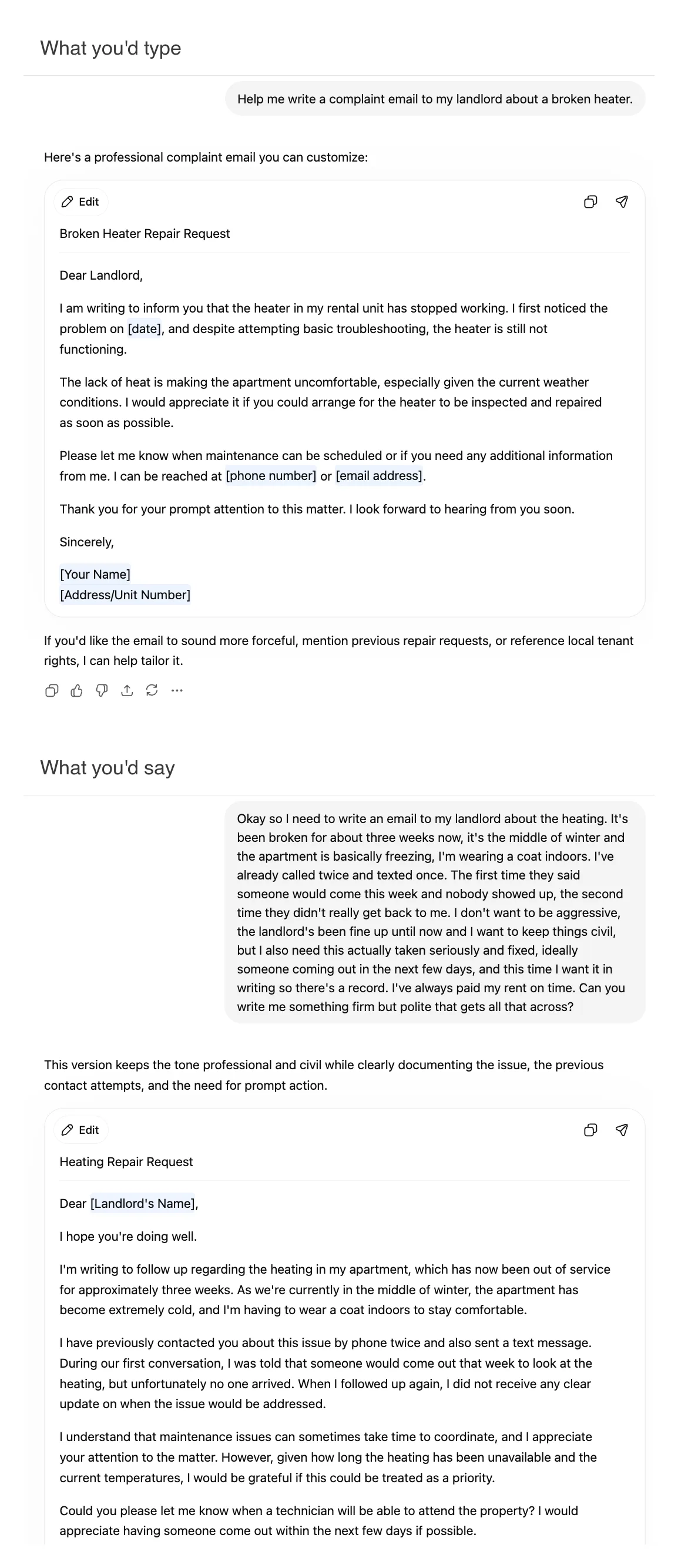
The top one is what most people type, because typing is work and you keep it short. The bottom one is what falls out of your mouth in fifteen unguarded seconds: it’s been three weeks, it’s the middle of winter, you’re wearing a coat indoors, you called twice and texted once, someone promised to come and never showed, you pay your rent on time and you want this in writing but you don’t want to sound like a jerk. You would never thumb all of that into a phone. You’ll happily say it.
And the AI is good with the messy version. More than good. One developer, in a Hacker News thread about the moment AI clicked for him, leans on it so hard that he says “I use voice-to-text” for most things and doesn’t even read what comes out, because “the LLMs get it.” Sometimes he spends “20 minutes just talking to the microphone” before sending a single prompt. You don’t have to go that far. The point is that talking lowers the filter, and the context you’d have trimmed for brevity is exactly the context that makes the answer fit your situation.
You don’t need to be technical for this to work. Another commenter in the same thread guessed at precisely our reader: “I can imagine a non-technical person rambling enough that the AI gets what they mean.” Rambling, here, is a feature. The model is built to find the thread in a long, loose description, and the longer and looser yours is, the more thread there is to find.
Two buttons that do different things
The message box usually has two voice controls, and they do different jobs.
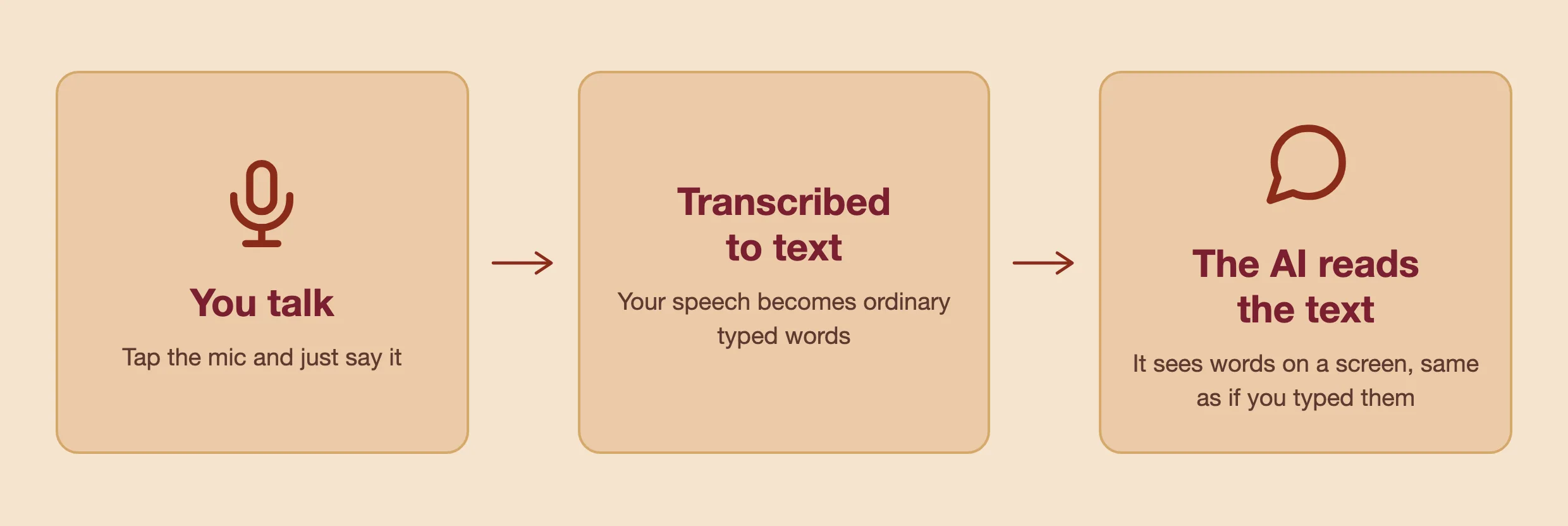
The one we’ve been talking about is dictation: a small microphone icon. You tap it, you talk, and your speech turns into text right there in the box, where you can read it and fix it before you send. What the AI receives is words on a screen, the same as if you’d typed them. Anthropic’s help page draws the line in one sentence: “Dictation converts your speech to text so you can type prompts by speaking. Voice mode is a full two-way conversation.”
That other thing, voice mode, is the talk-to-a-robot experience: you speak, it speaks back, out loud, in real time. It’s genuinely useful when your hands or eyes are busy or you want a quick spoken back-and-forth. But for a careful answer you can read, reread, and copy, most heavy users reach for the quiet mic instead. One put it bluntly: he uses dictation “because then the response is in text. There is no way to prevent ‘responding in kind’ if I query the thing with audio.” Talk at the voice mode and it talks back, briefly. Talk at the dictation mic and you get a full written answer you can actually use.
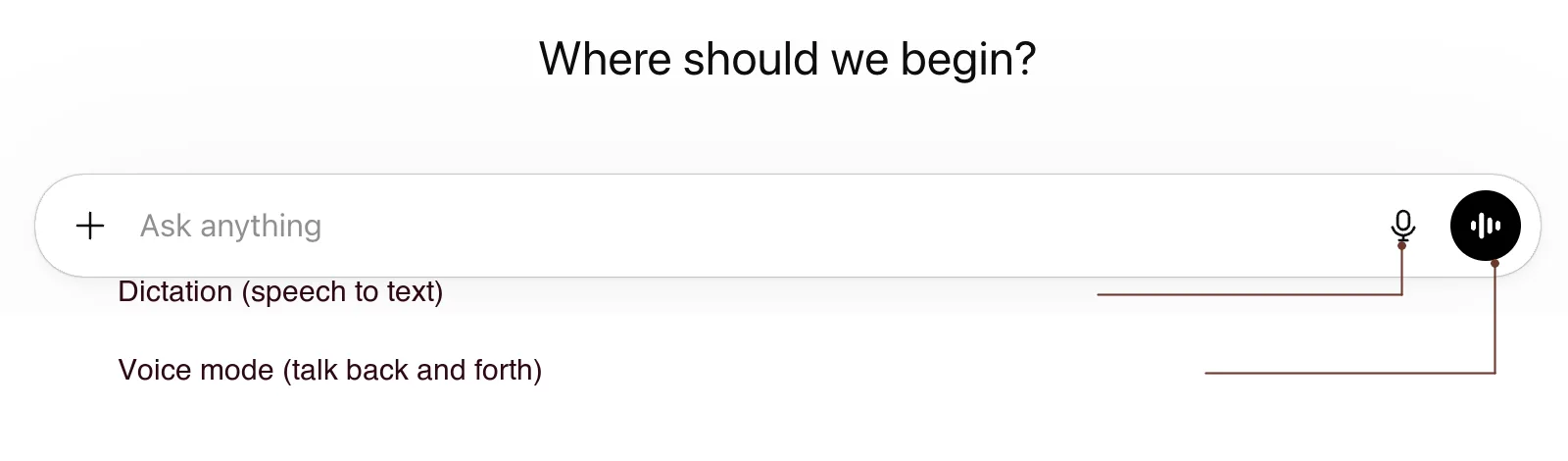
On ChatGPT, both controls live at the right edge of the box: the microphone is dictation, the black soundwave circle is voice mode.
Dictation lands on the model you already picked
The second reason to dictate is about which model you reach. A dictated prompt is text, so it goes to the same text model you’ve already selected, which on every app is the strong one. You don’t have to think about it.
There used to be a sharper version of this point. The real-time voice modes once ran lighter, faster models tuned to talk back without an awkward pause, so speaking aloud could quietly route you to a weaker brain than the one you’d chosen. That gap has largely closed. ChatGPT retired its old lighter voice model in February 2026. Gemini Live now runs a model built for audio from the ground up, which Google calls its “highest-quality audio and voice model yet,” while your typed and dictated prompts reach the heavier flagship, Gemini 3.1 Pro. And by one report, Claude’s voice runs the same Sonnet and Opus models as its text, though Anthropic doesn’t publish the model, so treat that as reported rather than official. The short version: “voice mode is dumber” is no longer a safe rule.
The dictation guarantee is the part that stays true on every app, whatever the voice modes are doing. Notice the model name sitting right in the Claude composer below: Opus 4.8, the same one a typed prompt would reach.
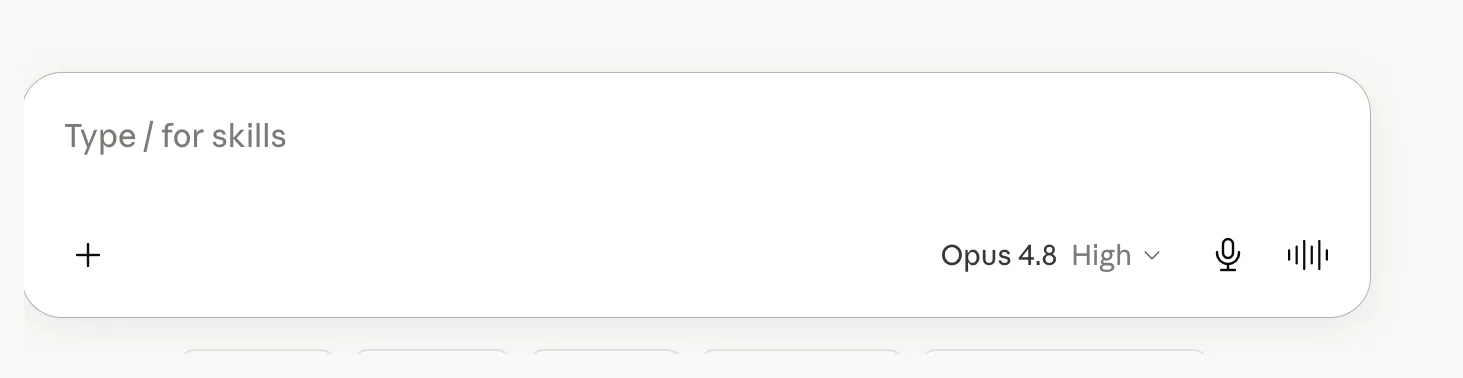
Finding that mic takes about two seconds on any app. In Gemini it’s the microphone at the right end of the “Ask Gemini” box, next to the model chip.

ChatGPT and Claude put the same microphone in the same place, at the right edge of the message box, on the phone apps and the desktop site alike. If you can see a mic, you can dictate.
The limits, and the one habit that handles them
Dictation isn’t magic, and it’s fair to know where it slips before you trust it with anything that matters.
It garbles things. Proper names, jargon, and unusual words are the usual casualties, because a name the transcriber has never seen is a name it has to guess at. Punctuation and capitalization come out approximate, and a noisy room makes all of it worse. The same developer who talks for twenty minutes also showed the wreckage: say “taken” and you might get “take and”; say “all the while calling the method” and you might get “although a while. while. call in the met of.” His punchline is the useful part. The model understood him anyway.
The worry deserves less weight than you’d think. When Stanford, Baidu, and University of Washington researchers timed people entering short messages on a phone in 2016, speaking came out close to three times faster than thumb-typing, about 153 words a minute against 52. Accuracy was a near tie, with error rates near one percent either way, so dictation isn’t trading speed for a mess. That was short phrases on a phone, not paragraphs on a full keyboard, so read the three-times as “versus your thumbs,” not versus all typing. The direction holds, and it matches what the model does in practice: it reads through the small transcription messes and gets your meaning.
Which makes the habit simple. Talk, then give the transcript a quick skim before you hit send, and fix exactly two kinds of thing: any proper name that came out wrong, and the one sentence that carries your actual question, in case it got mangled into a fever dream. Leave the rest. You’re not proofreading an essay; you’re catching the handful of errors that would genuinely throw the answer off. The whole thing takes a few seconds.
The same trick works far past the chat box
Once talking-instead-of-typing becomes a reflex, it stops being about the AI’s mic at all. Your computer can dictate into any text field you can click into, no app required. On a Mac, the system Dictation feature lets you “speak to enter text anywhere you can type it.” On Windows, pressing the Windows key plus H opens voice typing in any text box. So the same habit works in an email, a search bar, a note, and, for anyone who’s wandered past the chat box, in a coding tool like the Codex app or a Claude Code terminal, where the AI needs even more context and typing it all is even more of a slog. People already do this: one developer keeps a line in his setup file telling Claude that he’s usually dictating, so it reads his messages with that in mind.
Which is why it’s worth building into a habit now, whatever stage you’re at. The two reasons talking wins, more context and the strong model you already picked, don’t expire as you get more advanced. It’s the same good advice for a first-timer writing a polite email as for someone running an AI agent all day. The beginner habit and the power-user habit are the same habit.
So the next time you go to thumb a careful little prompt into the box, don’t. Tap the mic, say the whole messy thing the way you’d say it to a person, skim what comes back, and send. If you’re still finding your feet with these tools, the companion to this one, on asking in plain words or showing a screenshot, is the other half of the same idea: the easiest way to work with an AI is to stop treating it like a search box and start treating it like someone you’re talking to. This is just the part where you actually talk.